WireVitals · by Extrosy

Is it the Wi-Fi, the router, or the internet?
Now you'll know.

WireVitals runs 27 checks in about a minute and tells you, in plain words, what is actually wrong with your connection — and keeps watching for hours when the problem only shows up sometimes.

ANDROID · IN DEVELOPMENT Android 8+ · no account · no ads
WARN1 thing worth fixing

Calls and games lag while the line is busy. Latency climbs at half your download speed — bufferbloat in the router. Turning on SQM / Smart Queue at about 85 Mbps would keep it flat.

  • PASS
    Wi-Fi
    Strong signal on 5 GHz, channel 36 — 2x2 MIMO, airtime 18% busy
  • PASS
    Internet ping
    0% loss, 14 ms, jitter 1.2 ms
  • INFO
    DNS cross-check
    Your router answers DNS meant for 8.8.8.8 itself
  • PASS
    Calls & meetings
    Teams and Meet media: 50/50 replies, jitter 3 ms
  • WARN
    Latency under load
    +140 ms at 50% of the line; flat at 25%
  • PASS
    Path MTU
    1492 bytes, and routers report it properly — no black hole
Example result, drawn for this page — the app shows one row per check.

How it works

Measure everything. Explain it like a person would.

"The internet is slow" can mean a weak Wi-Fi channel, a router that queues too much, a provider sharing one address between hundreds of homes, or a DNS server that has stopped answering. WireVitals checks each link in the chain separately, so the answer names the part that is actually broken.

01 / CHECK

27 checks, one tap

Wi-Fi, router, DNS, the path out to the internet, NAT, speed, latency under load and more — each row appears the moment its check starts, with its findings as they come in.

02 / EXPLAIN

A diagnosis, not a number

A plain-English verdict names the root cause and what to do about it, and a card says what the line is good for right now — 4K video, calls, gaming, big uploads. Tap any row for the tables, charts and raw measurements behind it — and re-run that one check.

03 / WATCH

For the drops that come and go

Leave the monitor running for hours, screen off, and get an alert the moment the connection drops. Every hiccup is logged with its time and its cause — so "it dropped at 9:40" becomes evidence.

Two devices

Measure the path between two devices, live

A speed test to a distant server cannot say which end of a connection is at fault. Put WireVitals on two devices: one waits, the other connects and measures everything between them — loss in each direction, a call's worth of packets scored like a real call, the speed each way with the delay timed as it climbs, and how long the network keeps a quiet connection alive. Every figure is drawn the moment it is measured.
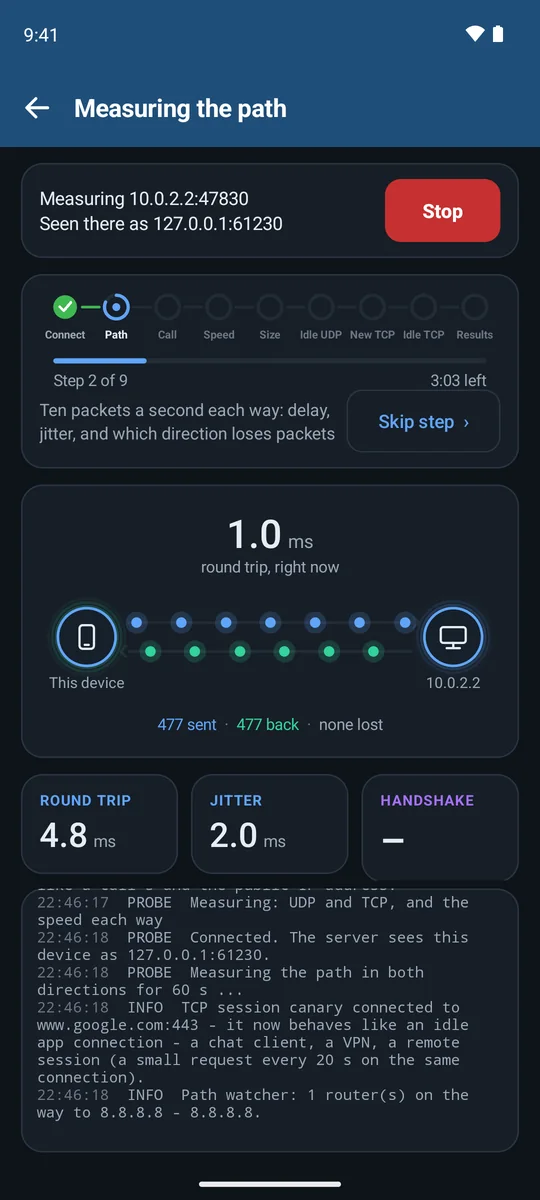
WireVitals measuring the path to another device: packets flowing both ways, 1 ms round trip, none lost
THE PATHTen packets a second each way. A lost one is drawn on the direction it vanished in.
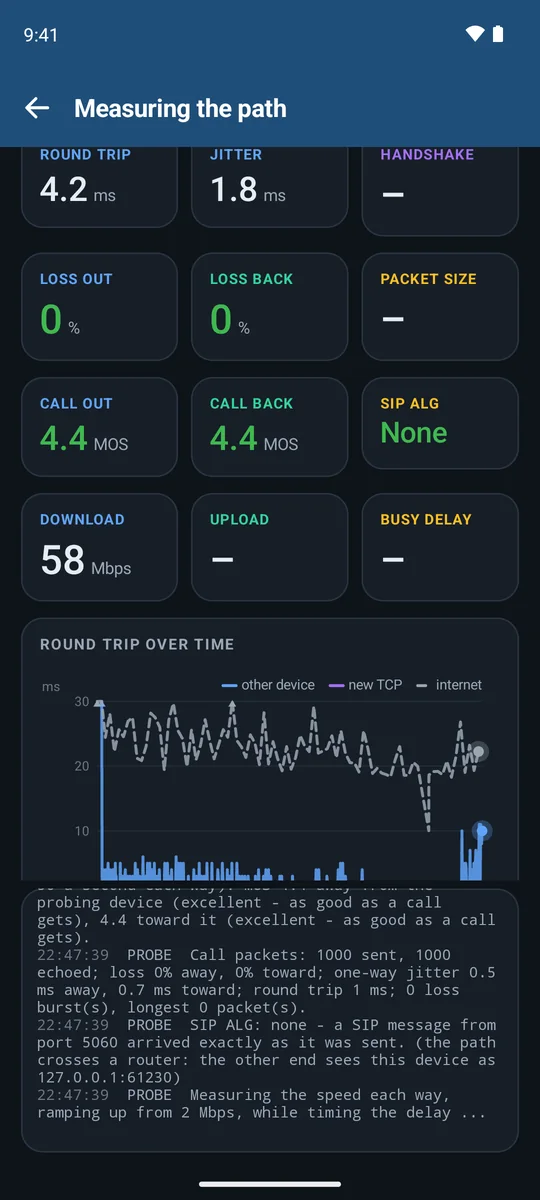
Tiles showing call quality 4.4 MOS out and back, SIP ALG none, 0% loss each way
CALL QUALITYTwenty seconds of call-sized packets, scored each way (MOS) — and a check for a router that rewrites calls (SIP ALG).
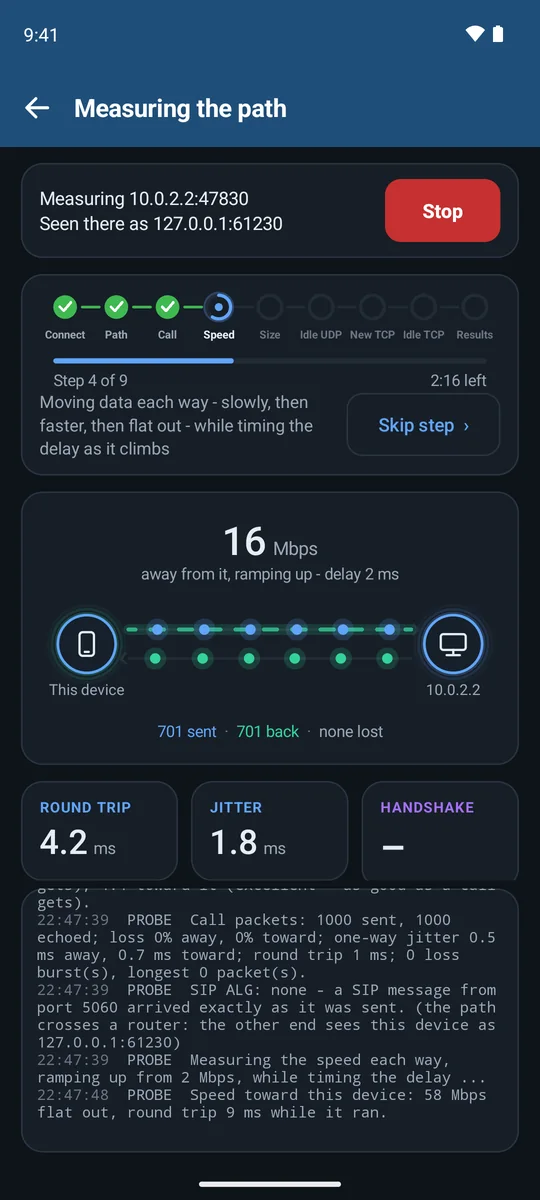
Speed step: 16 Mbps away from this device and ramping up, delay 2 ms
SPEED, RAMPEDEach direction starts slow and doubles until the line is full, while the delay is timed.
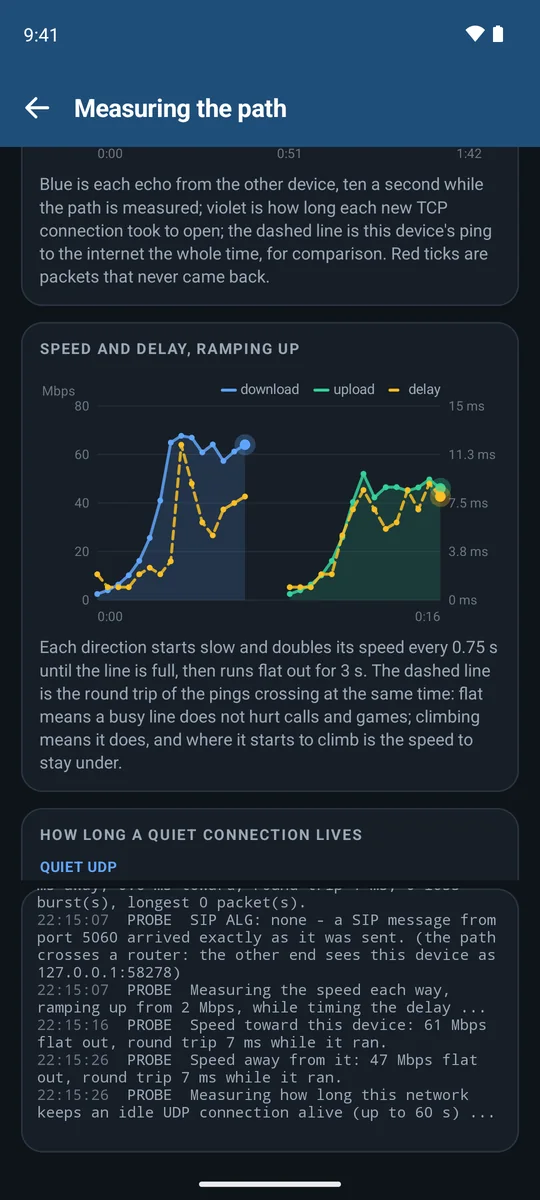
Chart of download and upload speed ramping up with the round-trip delay plotted alongside
SPEED AND DELAYFlat delay means a busy line won't hurt calls and games; where it climbs is the speed to stay under.
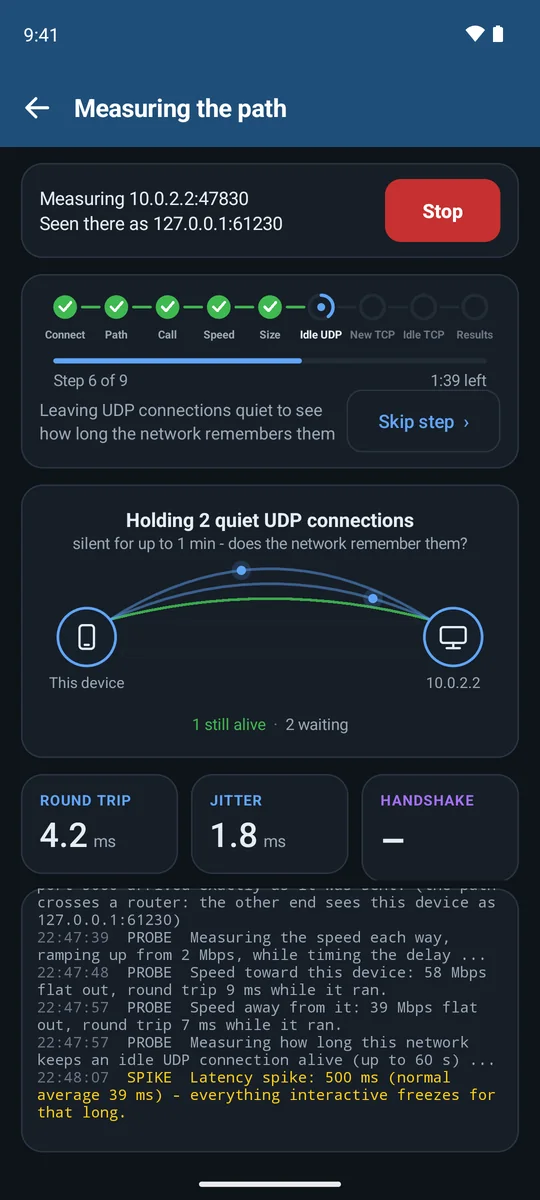
Idle connection test: two quiet UDP connections held open, one already confirmed alive
QUIET CONNECTIONSHow long the network remembers a silent connection — why calls and games drop after a pause.
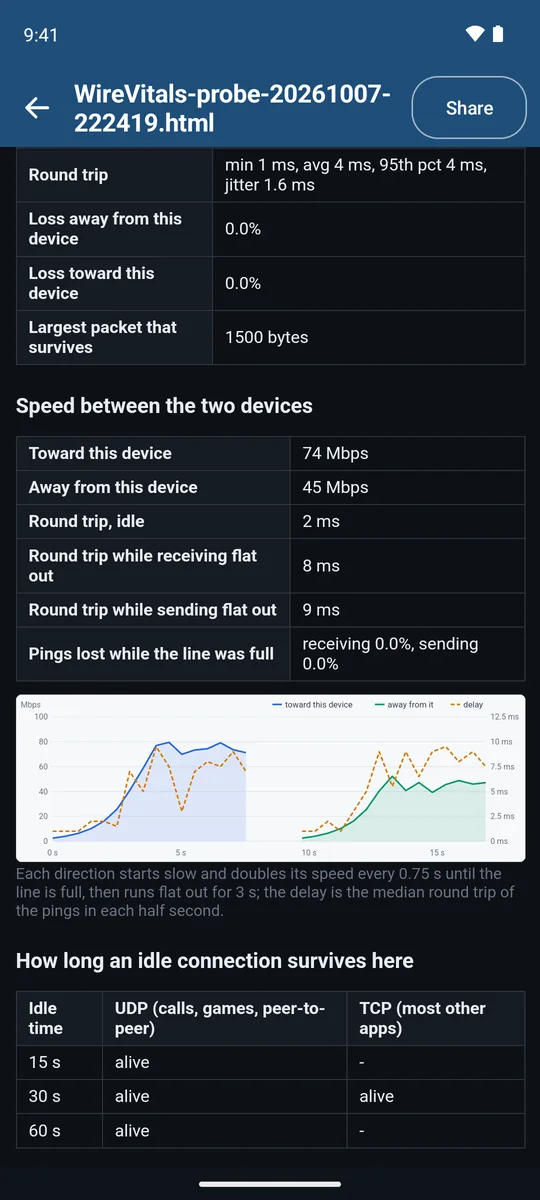
Saved report with tables for round trip, loss, packet size, speed each way and idle connection lifetimes
THE REPORTEvery run is saved with its tables, charts and verdict, ready to share.
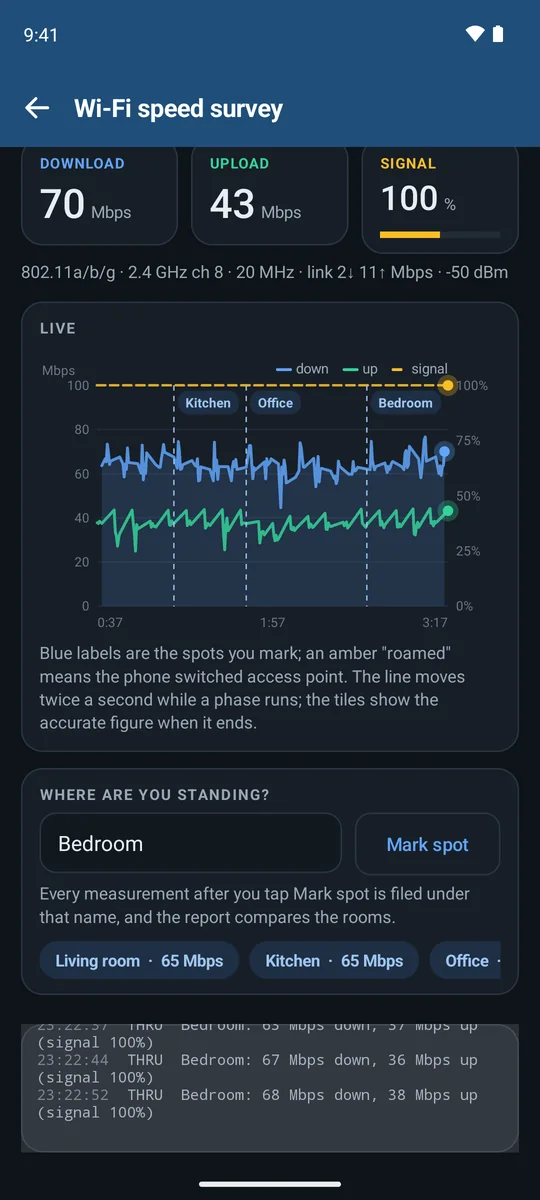
Wi-Fi speed survey: live download and upload chart with rooms marked as Kitchen, Office and Bedroom
SPEED SURVEYWalk room to room with the other device waiting. Mark each spot; the report compares the rooms.

How it's set up

On one device, tap Wait for the other device. On the other, tap Find — on the same Wi-Fi it turns up by itself — then Start measuring.

The waiting side shows a key for the other to type; on your own Wi-Fi you can switch it off. To measure across the internet, it asks its router to open the port for the session.

Waiting is always free. On the connecting side a free run lasts 30 seconds; the full test is part of Pro.

Screens from the app in an Android emulator, measuring against a second device on the same computer — so the addresses shown are the emulator's own.
What it checks

From the Wi-Fi radio to the far end of the internet

Wi-Fi, properly

Signal steadiness, band and channel width, how busy the access point says its airtime is, roaming, security, and how many MIMO streams the link really uses.

Your router and its DHCP

Loss and jitter to the router, the DHCP server and the lease it hands out, and any extra IPv6 router announcing itself on the network.

The path out

Ping, jitter and loss to the internet, a hop-by-hop traceroute that spots carrier-grade and double NAT, and a path-MTU test that finds the "black holes" that stall VPNs.

DNS you can trust

Your DNS against Google, Cloudflare and Quad9 — including whether your router quietly answers in their place.

Speed with the delay that matters

Download and upload graphed every half second, then the line held at 25, 50 and 75% while latency is measured: bufferbloat, with the SQM setting that fixes it.

Calls & meetings

Real media tests against Microsoft Teams' and Google Meet's own relays — round trip, jitter and loss graded against Microsoft's published limits.

Gaming readiness

NAT type in console words (Open / Moderate / Strict), latency to every AWS game-server region, Steam relay and nearby Discord voice region, lag while the line is busy, and Xbox Live, PlayStation Network, Nintendo, Steam and Discord reachability.

Tampering & attacks

Login-stealing name poisoners, forged DNS answers, certificates re-signed by something in the middle, HTTPS being stripped, and sign-in pages that ask for a password without encryption.

VPNs and proxies

With a VPN up: does your web traffic, your DNS or your IPv6 leak around it?

In the app

Plain answers, live charts

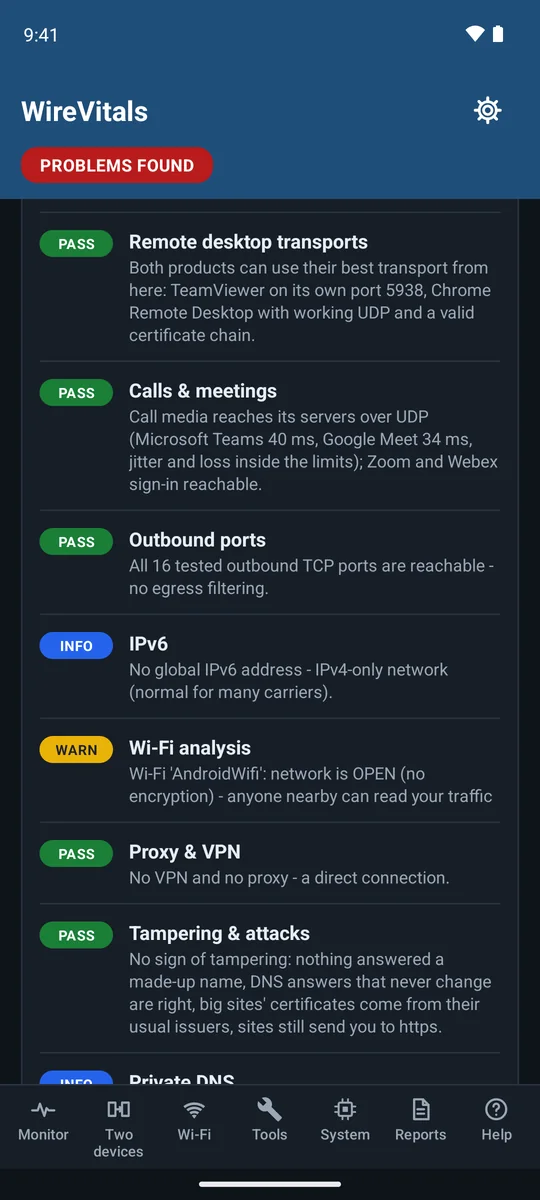
Check Internet results: a row per check with PASS, INFO and WARN pills and a one-line finding each
CHECK INTERNETOne row per check, each finding in plain words. Warnings are yellow, failures red.
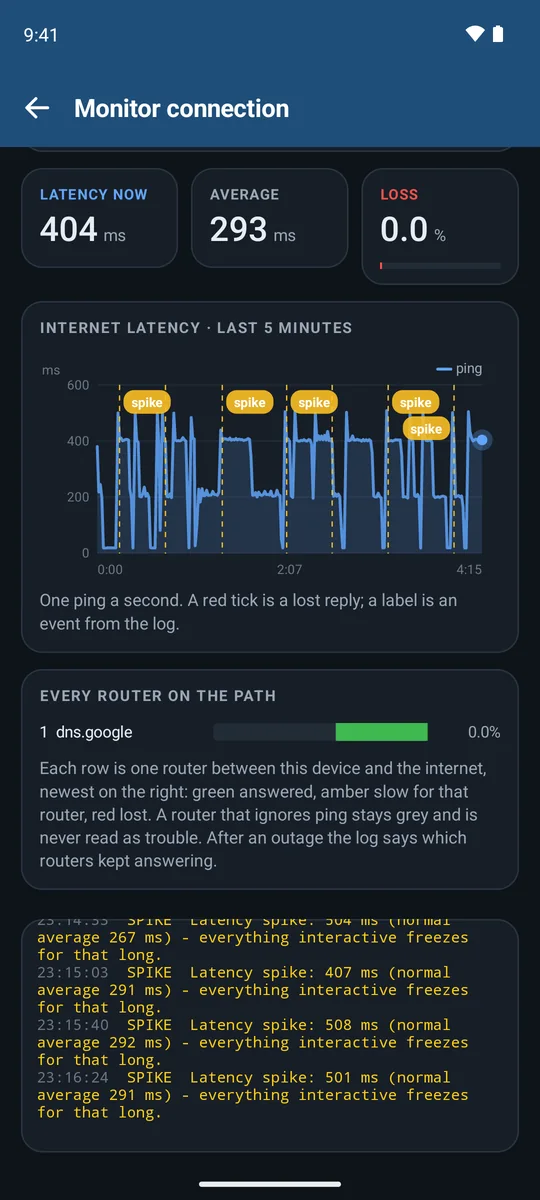
Monitor: live internet latency chart with spikes labelled, and every router on the path
MONITORA ping a second, with spikes and drops labelled. With Pro it also watches every router on the path.
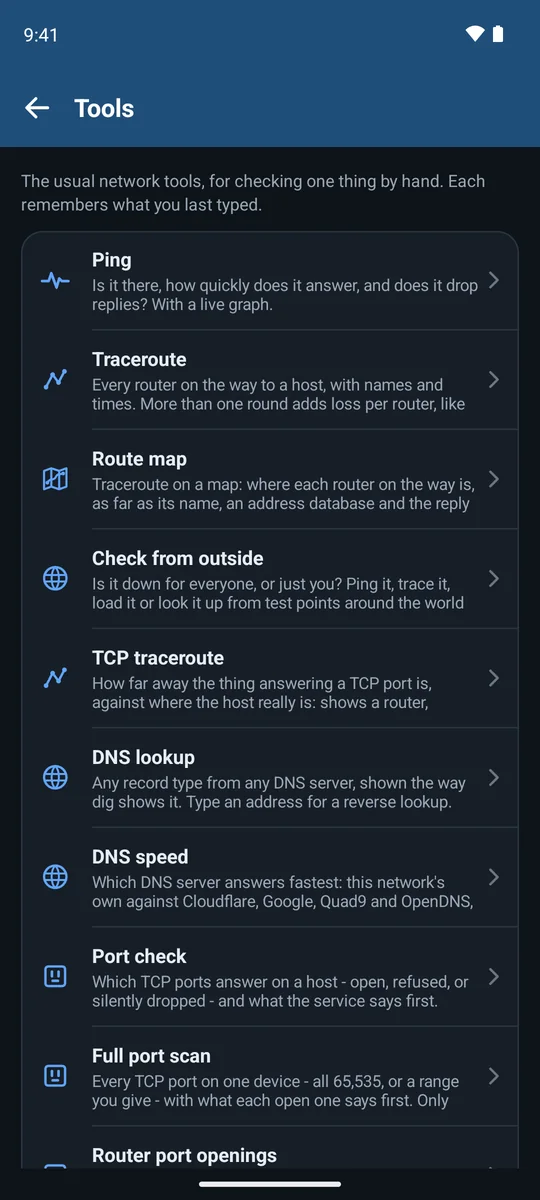
Tools list: ping, traceroute, route map, check from outside, TCP traceroute, DNS lookup and more
TOOLSThe usual network tools, each remembering what you last typed.
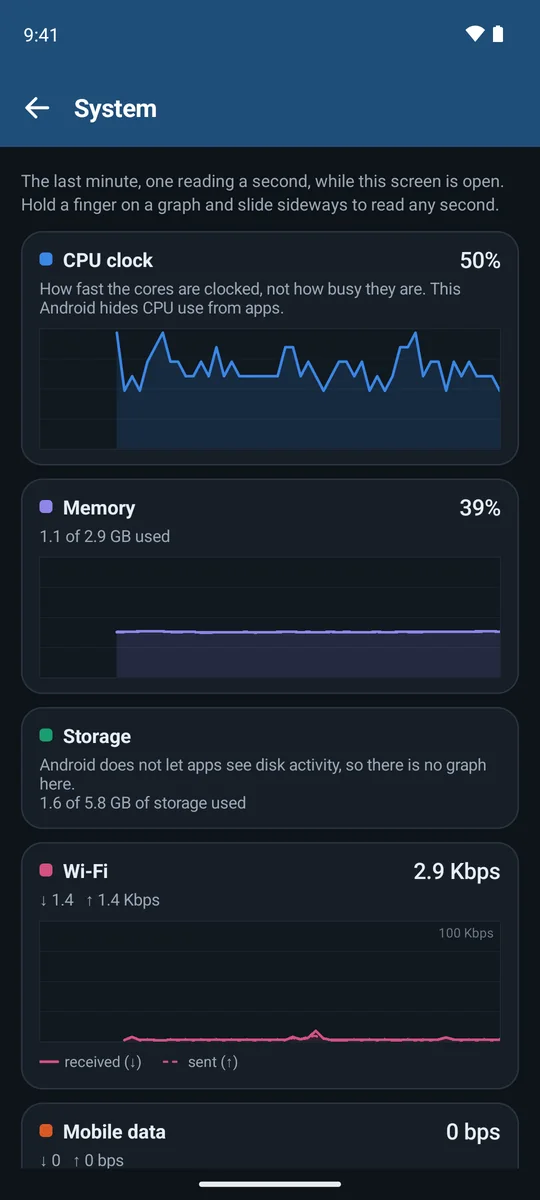
System tab: a minute of CPU, memory and Wi-Fi traffic graphs
SYSTEMA minute of CPU, memory and traffic — is it the phone, not the network?

Emulator screenshots. The emulator's own route to the internet is slow, which is what the monitor is catching here.

Beyond the one-minute check

The rest of the toolbox

MONITOR

Watch a flaky connection for hours

Internet pings, plus the watchers you pick — your router, a long-lived connection, a call-style UDP keepalive, DNS, Wi-Fi roaming — with a live latency chart and an event log you can share. It can time every router on the path the whole while, so an outage shows where it starts; add notes as you go, get alerts when it drops and comes back, and turn days of runs into an evidence report for your provider. Runs with the screen off.

TWO DEVICES

Measure the path between two phones

Loss in each direction, how long the network keeps idle connections alive, a speed ramp that times the delay as it climbs, and a 20-second call test with a MOS voice score and SIP ALG detection — all drawn live.

WI-FI ANALYSER

See the air around you

Every nearby network drawn across the frequencies it really occupies, a spectrum waterfall, airtime per channel, and a walk-the-house speed survey (with a second device) that says whether a dead spot is weak signal or busy air.

DEVICES

Who is on this network

Every device found, its maker and likely kind, open ports — and a NEW badge on anything never seen on this network before.

HISTORY

Trends over days

Every full check is kept. Charts and a day-by-day table show which problem keeps coming back and whether evenings are slower — with an optional check every few hours.

SYSTEM

Is it the phone, not the network?

A minute of CPU, memory and traffic, one reading a second — because a phone flat out on CPU stutters calls exactly like a bad line.

22 tools for checking one thing by hand, a page of useful websites (outage reports, status pages, other speed tests) — and a home-screen widget and quick-settings tile that run a check in one tap:

PingTracerouteRoute mapTCP tracerouteDNS lookupDNS speed Port checkFull port scanRouter port openingsWeb requestTLS certificateWhois IP whoisSubnet calculatorWake-on-LANPath MTUTime serverNetwork info Check from outsideSignal meterNetwork use by appiperf3 speed test

Free, with an upgrade

Finding the problem is free. Pro is for watching it and proving it.

FREE

Everything to find it

Check Internet with every check, as often as you like; every tool but iperf3, the signal meter and Check from outside included; the Wi-Fi analyser, the device scan, System, reports, the widget and tile — and being the waiting side of a two-device test. Monitor runs last 30 minutes; a two-device test or a speed survey runs for 30 seconds, once every 15 minutes.

PRO

Everything to prove it

The monitor without a time limit, overnight included; alerts when the connection drops; every router on the path, over time; checks on a schedule; the evidence report for your provider; full two-device tests with call quality, speed and idle-connection tests; the speed survey without a limit; and iperf3 speed tests to any server.

ONE PURCHASE

No subscription

Pro is a one-time purchase in the app, through Google Play. No account with us, nothing renewing, and the free part stays free.

Private by design

It tests your connection. It doesn't report on you.

01 / NO ACCOUNTS

Nothing to sign up for

No account, no ads, no analytics, no trackers. Extrosy runs no servers and receives nothing from the app.

02 / ON YOUR DEVICE

Results stay with you

Reports, logs and history live in the app's private storage and leave only when you tap Share.

03 / NAMED SERVERS

Every server, listed

A network test has to talk to the internet. The privacy policy lists every test server the app contacts, and what it sends.